Apple Account (ID) Lockout August-October 2022
Locked Out of the Ecosystem and Modern Life
written 2022-January 2026published January 2026
Life Before The Trouble
July 2022Bought a new iPhone 13 near the end of June, for a very important upcoming trip just a few days later. This was my first “real” cellular handheld device: i’d occasionally used other people’s old “flip” and “feature” cellphones, and i did have a hand-me-down iPhone 4S given to me a few years prior, which had been disabled for cellular before i received it and which i never activated because it was such a crap voice telephone (which i knew from having several times called the previous owner using that exact iPhone from a decent quality hardwired telephone setup). There were a lot of new-to-me technologies, including iCloud, which i’d not needed to use before. There was a major learning curve and i only had a limited amount of time prior to the trip to get the new iPhone minimally set up.
Welcome to Apple 2FA
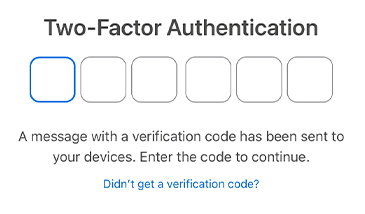
Decided that Apple’s Two-Factor Authentication (2FA) ought to be mature enough by now to be usable, and syncing between the iPhone and my decade-old (in 2022) Mac seemed worthwhile. Those who’ve used Apple’s 2FA know that when a device asks for/needs a 2FA code, a window opens up on it with 6 boxes into which the 6 characters may be typed:
On one or more other trusted devices a person owns, an alert shows up with a small map very roughly showing the location of the device making the request[1], with the options Don’t Allow and Allow:
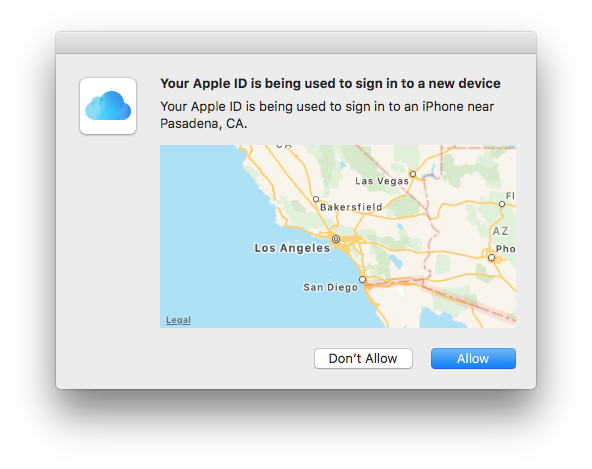
Don’t Allow cancels the process on that device. Allow displays a 6-digit code to be typed into the other device which is already displaying the 6 box form. On this late June day—my first time using Apple’s 2FA—things worked exactly like that: i was set up in iCloud for the first time ever, with things successfully syncing between my Mac and iPhone.
Life was good. The iPhone basically did what little yet critical functions i asked of it during the trip, and seemed marginally useful once i was home. But i’m a Mac person, since 1986, and that’s where most of my life transpires.
It Started Innocently Enough
Early August 2022I was sitting there one sunny midsummer early afternoon working on my Mac, with my shiny one month old iPhone 13 asleep a short distance away. The iPhone woke up with an alert that something wanted to sign in. I was busy and focused on other things. Having been conditioned for decades that computers and computer-like equipment often ask for account credentials at odd times and seemingly for no reason, i looked at the map, found it probable, and tapped Allow. Though not fully obvious right away, this is where all hell broke loose—hell that continued for nearly 3 months.
What happened on this day is that both devices showed location maps with Don’t Allow/Allow and displayed 6-box fill-in forms. I remember thinking {How is this even possible? How does this happen? What does this mean?}, but at the time had no idea and no clear sense that anything was wrong.
Conditioning Matters!
Before we go a moment further, we need to discuss user conditioning, and what is reasonable to expect of device operator behavior.
Few if any computer-like technology users with more than maybe a year’s experience have managed to only experience wholly truthful alerts. Years of pop-up ads, erroneous or misleading alerts, and related interruptions often served someone else’s agenda (e.g. advertisers tend to belive their ads are Important! and need to be paid attention to right this very microsecond!!) or were errors. The longer one has been using these devices and experiencing these sorts of interruptions, the more desensitized to them one becomes. I believe most of us want to get on with whatever we’re doing and want the alerts to go away and leave us alone—i sure do!
Keep in mind that i was brand-new to Apple’s Two-Factor Authentication. Nowhere was i told/instructed that these alerts were We Mean It! critical. I worked at Apple in the 1990s and not all such alerts at that time were critical, or even correct. When i first saw this alert, i had no reason to believe anything was amiss. I assumed it was yet another Apple glitch, so i tried to do what it seemed to be asking and Allow. Obviously this was the wrong thing to do.
Here’s the thing: people make mistakes. Just about every site and Apple itself have mechanisms for people who forget their password/passphrase. I am a responsible person who has only had to do this maybe 2 out of 400 or 500 sites/services/apps/platforms requiring passphrases since the mid-late 1980s. And yet after making this similar mistake one time, there was no recourse: even with AppleCare+ all paid up, no way to recover from this honest mistake. That’s fucked up.
But this is jumping ahead in the story. Let’s go back to where we were on the first day and more carefully go through how things unfolded….
Then It Got Weird
Having thought i’d made the correct choice picking Allow, i was then presented with verification codes on both my new iPhone—which is what i thought the alert wanted—and my Mac, where i expected to see it. This was the next warning that something was amiss, which i misunderstood because i didn’t understand why i was getting an alert in the first place and thought Apple just wanted me to re-verify my fairly new iPhone. Glitches happen—especially in Apple Land.
Also weird to me at the time: different codes on the Mac and the iPhone. The obvious-to-me thing to do was type the code on Device A into the form on Device B, and the different numeric code on Device B into the form on Device A. Neither of those worked: Incorrect code. No matter which code i typed into whichever of the two devices, the Apple servers were not happy, and kept reporting failure. Gave up, shut down the iPhone (don’t remember whether i did that with the Mac too).
Half an hour later, restarted the iPhone and tried again: same failure. Most things i cared about seemed to still be working (e.g. iMessages in Messages), so i Cancelled out of everything, left everything alone for a day or so, and tried to go on with life.
Then It Got Confusing
Early-Mid AugustA couple days later (after this first started), tried again: same result. This time i read the alert text more carefully, and realized it wanted a verification code from my other iPhone.
Other iPhone?
Well… this was indeed my first purchased-new fully-functional cellular + Wi-Fi handheld device. However, had i enabled iCloud with my Apple ID on the iPhone 4S and forgotten about it?
Started up the 4S and… no, no i had not ever activated iCloud on it.
Posted on the Apple Discussion forum around this time, and got… crickets. No advice.
Then It Got Annoying
Mid to Late AugustLife needed to go on. iCloud functions seemed to be working on both my Mac and my iPhone. I started selecting Don’t Allow when the alerts came up, which they continued to do.
Then It Got Upsetting
Late August through early SeptemberAt a certain point in August, at a random moment on a random day, Apple’s systems determined i needed to reset my Apple ID password right then and there, never mind that i was in the middle of trying to get some work done. Tried to do it on my Mac, since it’s easier to type, but ran into some bug that gave me an empty gray box, and could not proceed. Switched to the iPhone, and, being very angry/upset and even more shaky-handed than usual, could not type a new strong password into the box and verify box correctly, multiple times.
The Apple servers decided that neither my Mac nor my new iPhone could be trusted, and locked me out of iCloud. Syncing stopped immediately. Within days, anything requiring my Apple ID didn’t work—unless i was still signed in, such as with Messages and FaceTime. Could not get into the App Store. Could not post on Apple Discussions.
Power cycling iPhone and Mac did not help. Could not sign out of iCloud, because it was Not Possible to sign out without disabling Find My on the iPhone—and Not Possible to disable Find My without signing into iCloud. Gaaaah!—Catch 22!
Tried several more times on different spaced-apart days in August to get 2FA to work. Always the same failure. No matter what i did, neither device liked any code: their own or the other’s. Still had iMessages and FaceTime—important then—so i went on with life’s other very pressing, urgent issues.
The Big Algorithm Oracle
Early to Mid-SeptemberEarly September—a month or so into this madness, it was time to squarely face the issue and get with AppleCare+ Support. Waited this long because i had to set a whole day aside to call Apple, since i was so locked out that a voice call was my only support option. Note that i bought AppleCare+ with the new iPhone, so i should be receiving top-tier support.
The first-line agent was OK, but it was very clear very fast that my case needed a senior agent, as this failure is not supposed to happen. Representative tried to escalate to an advisor, eventually reporting back to me, “He hung up on me”(!).
Eventually on this call, i was transferred to a senior agent. That agent was Amber. Amber promised me that she’d be the one handling my case—i wouldn’t have to deal with anyone else, repeat myself, etc. She asked me to submit screenshots, but—oh dear!—the submission form required that i enter my Apple ID, which was locked out and the whole point of the problem/failure! I carefully described what i was seeing, and she typed it into the notes to be sent to “the engineers”. We scheduled a callback for noon 2 days later. She was supposed to send me contact information, but never did.
Two Days Later…
Noon 2 days later, i was all ready, and… no callback. I waited until 12:34 PM, then used a link in an automated Apple email to get back in the phone tree with my case number pre-loaded. Another agent answered: Amber wasn’t in yet, but the callback was in her queue, so i’d likely get a call “later today”. The agent was able to read some of the engineers’ notes, suggesting that both my devices had been deemed untrusted, and i’d have to recover my Apple account. Recover = We don’t trust you. Prove yourself to us.
Did i mention i was all paid up with AppleCare+? And this was the best customer support Apple could give a new iPhone user?!… who used to work for them?!?
Amber never called back. Another agent did, who failed to explain that they too were a senior agent and were taking over the case. Amber’s promise to stick with me was broken. This senior agent told me that Engineering had noted that my Apple Account was in “account recovery”, and that all my Apple devices associated with the Apple ID other than the iPhone would have to be turned off “for at least 24 hours but could be for 5-10 days”(!). This was the eve before an extremely important event in my personal life for which i required working cellular communications. I mostly cared about my Apple Account/ID in terms of Messages and FaceTime for essential communications—still working then—so i blew Apple off for the duration.
Apple Account (ID) Recovery: Locked Out Of Life
Later in September once the extremely important personal life event was over and i returned to the Apple ID/2FA issue, another day of wrangling with Apple support on voice phone calls revealed that there was No Option other than the nuclear option: Account Recovery… where i was already… doing Every. Single. Thing. on Apple’s terms.
The critical thing to understand about Account Recovery, and Apple’s 2FA for that matter, is that they are entirely automated systems that do not allow human interaction, to avoid rogue employee security breaches/issues. That also means that i and others are wholly at the mercy of Big Algorithm. Apple Support can hold my hand and commiserate, but they have zero power to do/change anything. The System Decides All.
If one has the proper equipment, knows about the option, and is prepared in advance before anything bad can happen, one way to avoid Big Algorithm is to: set a Recovery Key. Not having known of this option beforehand, it was not available to me. Months after i survived this Tech Hell, as of late January 2023, Apple added another option: use a physical Security Key.
I was told that i had to sign out of Apple ID on all devices and keep my Mac turned off for the duration of the recovery process. A callback for the next day was scheduled, entirely to ensure that i received the automated system email that would dictate my future. I was warned that while recovery was typically a 1 to 3 day process, “it could take up to 30 days”.
Technically, it’s all devices other than the iPhone that a person has to turn off. Not having an iPad nor anything else signed into any Apple service with that Apple ID, for me it was “just” my main Mac. Two reasons the iPhone is primary:
- It’s the only device with a phone number hard-associated, which is important for verifying identity
- In my case it’s running the latest OS, so best tuned to work with Apple’s security servers/infrastructure
Now if you’re the sort of person who lives on your iPhone and use it as your primary computer-ish tech device, you may be thinking {So what? No big deal}. For me who was still learning the device and hadn’t had time to even finish setting it up—not even loading on any apps nor Safari extensions (no ad blocker! Gaaaah!)—Big Deal. Tragically big deal.
The Oracle’s Final Answer
The following day, Big Algorithm gave me my answer: 30 days. Through no fault of my own, with no recourse despite my AppleCare+ status, i would be locked out of my Apple account and my main Mac, for basically a month!
One Month In Retro Land
Mid-Late September to Mid-Late October{This shouldn’t be so bad, should it?} i remember thinking. After all, i still had (and still have) my former main Mac, in use all the way through early fall 2016. It’s never touched my Apple ID (for critical stuff like iCloud, Messages, FaceTime, etc.[2]), and as long as i didn’t run anything that pings any Apple servers with that ID, the recovery process wouldn’t be reset.
Well… a lot changed on the Internet between 2016 and this fall 2022 lockout. Critical security certificates installed in the OS expired. WWW browsers which were accepted back then no longer were accepted on certain sites. Even life-saving TenFourFox with its own certificate store was discontinued a year prior (2021. Thanks, Cameron! It was great).
Running OS 10.4 Tiger and having anything on the WWW working well was a dicey proposition as of fall 2016. It was certainly no better in early fall 2022. Reddit wouldn’t let me in. Oh wait—i have a shiny new iPhone! I’ll use that. Nope: Reddit tried to force its app, and i’m locked out of the App Store due to the Apple ID issue. That’s alright, Reddit’s not that important. Tumblr, nope. Bank, nope (no big surprise there). DeviantArt?: don’t even kid me! They couldn’t stand my preferred WWW browser on my then-newest Mac (the one i couldn’t turn on without resetting the lockout wait time). Did not even try.
Thankfully Fastmail was in 2022 and last i checked still is excellent on supporting older devices, so i still had email (after some adjustments for greater security). I might have really lost it had that been cut off.
Older sites and forward-thinking sites which put a high priority on accessibility and compatibility with legacy systems were my refuge. I was doing a lot of van repair work, and the slantsix.org site is (as of the last external link check date of this page) still running older bulletin board software, so it still worked fine. Fantasy Feeder was tested with this older Mac and they value backwards-compatibility, so it worked quite well. Wikipedia worked.
It occurred to me that there were a couple of other Macs in the household which could run slightly newer OS X versions, despite not having been fully set up as everyday full-service machines with all my usual files etc. Tried them, but no joy: no advantage over the Tiger system. Accessing my own website at my web hosting company proved impossible: there exists no SFTP software for the Mac that runs on OS 10.4, 10.6, or 10.7 (the latter the newest OS X i could run on the older Apple Account-free Macs i had at the time) that operates with the modern encryption standards my hosting company requires. I couldn’t and didn’t argue with their requirements: they’re well-reasoned. I could still do many things on the older Macs that can’t go past these OS versions, but WWW and SFTP aren’t amongst them.
At the time, i was in the midst of weekly regular releases of new chapters to fiction stories i wrote. Having my story release workflow only on the newer Mac was my oversight. It might have worked on one of the older Macs, but i didn’t want to get into it. No point anyway, since releasing on my site happens first and is the canonical version, and without SFTP access i couldn’t release anything.
I spent insane amounts of time struggling to get these old Macs usable in 2022 online, with only partial success. The better answer would have been selecting and obtaining—or at least borrowing—a newer old Mac with newer OS options. But trying to shop online from any of the old Macs was an exercise in futility, and no way i was even going to try on an iPhone which lacked even a basic ad blocker for its WWW browser!
Recovery Day
Mid-Late OctoberReady for the Moment
Finally, the month was up! Very carefully, i set everything i could possibly need up at a work table, awaiting the promised automated message or call at 11:27:17 AM in my time zone.
Tense but ready, i waited. And waited. And waited. 11:28. 11:29. 11:30.
No call ever came in, from automation or human. No email. No text.
Apple let me down again!
Is this what AppleCare+ is supposed to be about?! I’m paying for this why?!
After a minute or so of top-of-lungs screaming and jumping up and down, i paced for awhile, then went on a bike ride to dissipate intense anger energy. Apple wasn’t there for me—at all! Promises Broken, over and over.
Settle… Try Again
Bicycle ride, calming tea, soothing foods… hours later i settled enough to maybe be able to type in passwords/passcodes on a small virtual keyboard. Went to iforgot.apple.com, entered my Apple ID. As usual, the Captcha wouldn’t let me in for several iterations.
Got in, expecting a call to my not-iPhone number, which i put in as my recovery number since Apple mentioned that if the iPhone fails, there’s no recovery at that number. What they failed to emphasize is that on iOS 11 or newer, having the iPhone’s own phone number as the primary recovery number streamlines the recovery process, making trust easier. Had they made that clear, i would have made a different choice. Also, having an alternate recovery number is very important.
No call to any phone number: Apple wasn’t having it. I’d need to access one of my trusted devices—of which i had none, since Apple no longer trusted them. Or a friend’s/family member’s device… also none of those at the time. Or go to the nearest Apple Store for one of their trusted devices. Or… wait for it… engage Account Recovery—the process i’d spent the last month waiting to escape!
Cancelled out of things and waited.
Know Another Apple User with a Trusted Device
Hours later, my housemate came home. She has a modern enough iPhone, and let me use it. I had to install an Apple Support app on her iPhone from the App Store, which for her thankfully was working. Then i had to go through that app on her iPhone to reset the password, carefully selecting “Another Apple ID” (might not be a literal quote) rather than resetting hers. Nearly everything happened on her iPhone in terms of data entry, because Apple trusted it. Eventually my account’s password was reset.
With trepidation, i tried entering the new password into my iPhone: success! And only 2¾s months after this whole mess started!
Recovering From Recovery
Regaining access to my Apple Account/ID and all that comes with it was only the beginning. Fully recovering from Recovery required due diligence, further work on my part, and time.
- First thing: let everything on the again-trusted iPhone stabilize and sync with iCloud.
- Second thing: set a recovery key, so i never have to go through this again. Discussed in detail below.
- Waited awhile to ensure that the iPhone seemed to be again fully and happily tied into Apple services and not throwing any hissy fits.
- Once i was satisfied that this was so, took the next big risk: attempting to get my newest (but not new!) Mac reconnected to the Apple Account (ID). As when i first set it up, the 2FA worked the way it was supposed to. macOS and/or Apple’s servers were a little fussy about reconnecting, but giving things plenty of time and calmly retrying after a failure or two produced success. It is so much easier to type passphrases on an actual full real keyboard!
- Tested texting and FaceTime, on both the Mac and the iPhone: success, finally, after a month without!
- Needed to replace the Apple ID password with the new one across a range of Apple services and devices, not all of which i remembered on the recovery day. This worked in a straightforward manner each time, proceeding calmly and carefully.
So What Happened To Cause This in the First Place?
Apple officially has no idea why i got that initial iPhone verification notification out of nowhere.
Most people know that the user ID portion of an Apple ID is in the form of an email address, and needs to be an actual, functioning email address belonging to the person to whom the Apple ID is assigned. I only use the email address associated with the Apple ID with Apple, so that means:
- Apple was hacked
- A rogue employee passed along my Apple ID address and someone brute-forced my password
- Someone somewhere got my Apple ID from any of a number of Apple emails, then someone brute-forced my password
- Nothing happened with the Apple ID and the Apple systems failed and produced the spontaneous verification message and ensuing failures
- Some kind of iOS or iPhone vulnerability leaked enough information for a malefactor to be able to trigger the verification alert
There may be other possibilites—not a security expert—but these are the only ones which have come to my mind.
Looking back on that first day in early August 2022 when the first unexpected verification alert came in, something potentially highly relevant took place an hour or so prior. Let’s go back to that first day….
It seemed straightforward… take my (then-)new iPhone with me to an appointment in case i needed to take notes etc., rather than the traditional pen or pencil and paper i’d often taken in the past for this purpose. After all, as a new mobile device user, i was belatedly joining the ranks of normies who take such devices most or all places they go. My decade-old Mac and this new iPhone had been harmoniously working for over a month, sharing my (one) iCloud account and (mostly) staying in sync with each other.
Problem (maybe) was: i was going to Planned Parenthood. Didn’t matter that it was for STI testing rather than anything having to do with abortions.
No issues at the appointment. Indeed, i didn’t need to use my iPhone at all.
About an hour or so after i got home, that was when the first unexpected verification alert came in.
Cleaning up old files about a month after the original publication of this article, i discovered further evidence indicative of malicious compromise.
On that very same day in early August 2022 when i started getting the Apple ID sign-in verification alerts, my wholly separate VoIP phone line received a string of a whole bunch of calls which displayed as “anonymous”, with silent voicemail messages. Contacted my VoIP provider at the time, but made no connection between these telecom-related events until late February 2026, just before typing this section.
VoIP was not set up on the iPhone. The only connections between the VoIP number and my iPhone and/or Apple ID were my Contact card on the iPhone and likely the phone number i used for the Apple ID, which was set up years before i had an iPhone or used iCloud.
The anonymous silent message calls ceased soon after starting. I don’t have a record of whether they only came in that one day or for another day or so thereafter.
Coincidence? I doubt it. Best hindsight guess: my iPhone connected to a rogue cell site set up near Planned Parenthood and something was able to be detected which allowed some piece o’ shit nitwit to in some way trigger a verification alert, and try to mess with my VoIP number as well. Had not even occurred to me that there would be a problem. If/when i have a need to go to an inexplicably controversial place like that again, i’ll either not carry a tech device like this, else it will be at least in Airplane Mode if not in some sort of Faraday bag in addition.
Successes and Failures
Me
- Yes, no question i made a mistake selecting Allow rather than Don’t Allow when that first alert came in, then repeating that same mistake in an attempt to fix the problem because i didn’t understand what was happening. However, as discussed above, it was an honest mistake a lot of people could make, and as with forgetting a password, there should be a way to recover from it that takes less than a month!
- Made things worse by failing to stop and really understand what was going on after that first unexpected verification dialog, and repeating the same error.
- Made things worse by rushing to type in my Apple ID password when angry and upset when Apple unexpectedly demanded it right that moment. Walking away from the tech for half an hour or so and then coming back and typing in the password correctly might have led to a shorter lockout.
- Had enough legacy equipment and non-Apple accounts and services set up and ready to go (mostly) to survive a month totally locked out of the Apple ecosystem.
Apple
- 2FA did apparently successfully keep my Apple Account out of rouge hands (unless it was an Apple system issue)
- Insufficient user guidance. People aren’t magically going to know how Apple 2FA works, and what are reasonable and unreasonable expectations.
- No method to overcome a one-time human error. We have this all over for recovering passwords—why not for this?!
- No method of speeding up the recovery process
- AppleCare+ support was unable to provide me any support for this issue, past hand-holding and commiseration
- AppleCare+ support repeatedly broke promises
How To Avoid This Happening To You
Unfortunately for me, much of the information below was either not available or i did not find it back in 2022, and no one pointed out any of it to me. I’m pointing it out to you right now, so hopefully you’ll not have to get locked out of your Apple Account.
- Read the Apple Personal Safety User Guide. Highly recommended—wish i’d known about it in 2022, if it even existed back then! There is a PDF version available from any of the pages of the web version (link in this list entry).
- Learn all you can about how Apple Two-Factor Authentication works before you first start using it. Start with this Apple Support article. Also review the overview article Security and your Apple Account.
- New to iCloud? Or never went deep into how it works? Mandatory reading: iCloud data security overview. This Apple article explains what exactly gets encrypted, where the encryption keys are stored (Apple or your device), and more. If all your Apple devices are running a new enough OS (examples: iOS 16.2, macOS 13.1), you may qualify for Advanced Data Protection for iCloud, which further reduces your dependency on Apple’s servers’ storage of encryption keys etc. Absolutely worth considering!
- Know what the authentication verification alerts look like, and that Apple means it very seriously:
Warning
If you see an alert like this:
- Pause! Take a slow breath or two.
- Read the alert carefully.
If you yourself are not at that moment doing anything which would cause a sign-in from an iPhone you control:
- Tap/click !
Same warning applies for any other type of Apple device (not just iPhones, as in this screenshot/example).
Read what Apple themselves have to say on this subject: If you think your Apple Account has been compromised
- If you are a responsible person who is able to keep track of your passphrases and other important account credentials on your own, and if you have suitably modern Apple hardware and software, set a Recovery Key. Doing so makes you, not Apple, most responsible for recovering your Apple Account. Apple’s systems still should be protecting your account, but if something happens, having a Recovery Key and the means to present it to Apple as and when required (be careful!) minimizes your and Apple’s dependence on Big Algorithm. This alone can be the difference between being locked out of all things modern Apple for a month or getting your account back in a reasonably brief time. Do read that linked Apple article in its entirety, but here’s a short excerpt highlighting the compelling nature of this option:
Improve your Apple Account security with a recovery key
A recovery key is a secret 28-character code that you can use, along with a trusted phone number and an Apple device, to recover your account and data.
- When you set up a recovery key, you turn off Apple’s standard account recovery process.
- Instead, access to a trusted device or your recovery key is required to reset your Apple Account password and sign in to your account if you ever lose access.
This gives you more control of your account recovery methods and can help prevent an attacker from gaining access to and taking control of your account.
- Manage/guard your Recovery Key as you do your other Most Critical private credentials. If you choose the Recovery Key option, Apple cannot help recover your Apple Account. Given how awful my experience was with Apple’s Big Algorithm Oracle handling things, this is a risk i’m personally glad to take!
- If all your Apple devices are running iOS 16.3, iPadOS 16.3, or macOS Ventura 13.2 or newer, you have the option of using a physical Security Key instead of having the Apple system send 6 digit verification codes to trusted devices. The Apple Support article About Security Keys for Apple Account has the details.
- If you have an iPhone, be sure that the iPhone’s own number is one of your Apple Account’s trusted phone numbers—ideally the primary number. This made no sense to me when i set things up: “But what about when the iPhone itself is compromised?” I didn’t know then that Apple trusts a phone number coded to one’s iPhone more than other phone numbers. Apple explains their interpretation of trusted phone numbers in their article About trusted phone numbers and trusted devices for Apple Account.
- Consider adding a Recovery Contact: a trusted Apple products user with a new enough Trusted Device and OS able to receive verification codes on your behalf. Apple provides instructions to the person acting as the Recovery Contact in their article Help a friend or family member as their account recovery contact.
- Especially if you’re not using a Recovery Key or Security Key and you’re stuck with Apple’s Big Algorithm Oracle account recovery process, at least read how Apple’s standard account recovery works before you need it. Highly motivating to suggest taking nearly any other path!
Aftermath
It’s over, right?
No, not really.
So far as of the latest revision of this article, i’ve suffered no similar issue(s). Apple’s inability to help me out in a more timely manner was traumatic for me—someone who for a few years gave my all working for Apple. The way this was (mis-)handled by Apple to me means my trust in Apple is even lower than before, and therefore:
- No way in hell i would ever even think about using a service like Apple Pay! Imagine not being able to pay for things for a month, through no fault of one’s own!
- Rather than adding more Apple services, as seems to be Apple’s bu$ine$$ model now that they’re losing the ability to truly innovate, i’m going the other direction: minimizing my use of Apple services, and going out of my way not to depend on any for anything crucial.
- Forgiveness is difficult to impossible when the one-month lockout cut me off from a number of social connections and activities, many of which these years later have not been reestablished.
- I’m sharing my experience with anyone who cares and may consider it, so more people can avoid what i went through.
Thanks for reading! Please share this article with anyone who might benefit from it, or be interested in it, or—long shot—be within Apple and possibly able to make things better.
))Sonic Purity((